Choosing a strategy
Applies to v1.7+ · ~3 min read · Plan routes
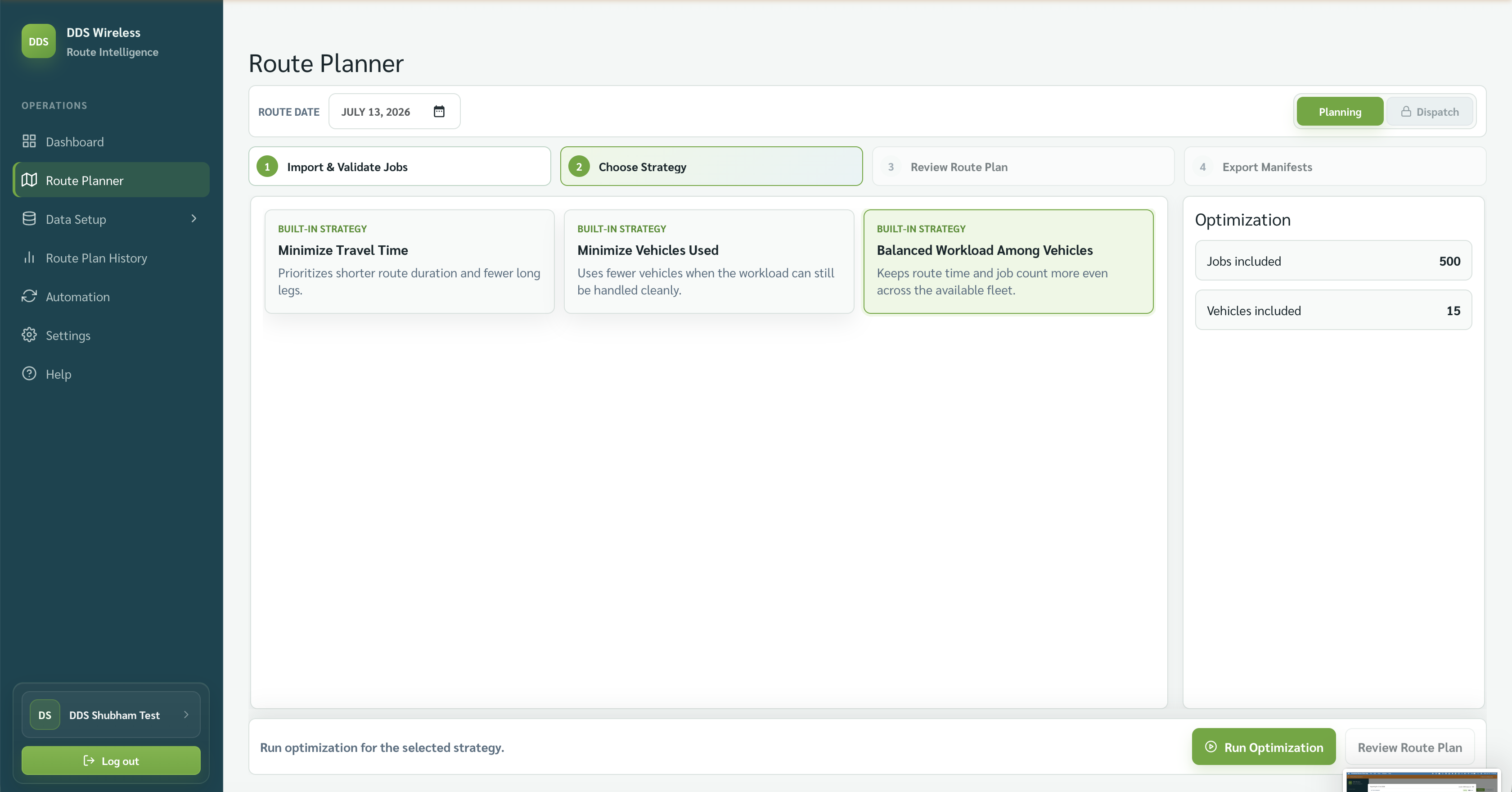
When you reach the Choose Strategy step in Route Planner, you pick the goal the Advanced Travel Oracle engine optimizes toward. The strategy you choose shapes the entire route plan — how many vehicles go out, how far they drive, and how evenly the work is spread. There are no wrong answers; the right choice depends on your operation's priority for the day.
At a glance
| Strategy | Optimizes for | Best when |
|---|---|---|
| Minimize Travel Time | Least total driving time across all routes | Fuel cost or driver hours are the main concern |
| Minimize Vehicles Used | Fewest vehicles that still cover all the work | You have more jobs than vehicles and want to hold some back, or driver availability is limited |
| Balanced Workload Among Vehicles | Even distribution of time and jobs across all active vehicles | You want every driver to finish at roughly the same time, or fairness among drivers matters |
Minimize Travel Time
This strategy tells the engine to find the combination of routes that adds up to the lowest total driving time. Individual vehicles may end up with very different workloads — one driver might have a long route while another has a short one — but the overall fleet drives as little as possible. Choose this when fuel spend or total operational hours are your headline metric.
Minimize Vehicles Used
This strategy packs as much work as possible onto the fewest vehicles. The engine will fill vehicles to their capacity limits before using the next one. Vehicles that aren't needed stay idle. Choose this when some of your fleet should stay off the road — for example, on a light day when you want to hold certain vehicles in reserve, or when driver availability is lower than usual.
Capacity and skills still apply
Even with this strategy, the engine won't overload a vehicle beyond its capacity or assign a job that requires a skill the vehicle doesn't have.
Balanced Workload Among Vehicles
This strategy spreads jobs and drive time as evenly as possible across all active vehicles. Individual routes may not be the most efficient paths, and total driving may be slightly higher than Minimize Travel Time — but every driver carries a comparable share of the day's work. Choose this when you have union agreements, fairness policies, or simply want drivers to finish around the same time.
Changing strategy after optimization
If the result doesn't look right, go back to Choose Strategy and pick a different card. Nothing re-runs on its own — the optimize button changes to Update Route Plan, and the engine only runs when you select it. Comparing two strategies takes seconds.
Custom strategies
Beyond the three built-in strategies, custom strategies configured for your account also appear in the Choose Strategy step as extra cards. Every card carries a label — Built-in strategy or Custom strategy — so you can tell them apart at a glance. Select a custom strategy the same way you select a built-in one, then Run Optimization.
More on custom strategies coming
Fuller guidance on how account-configured custom strategies are set up and what they optimize for will be added in a later update.
Related: Daily planning workflow · Review the route plan · Fix unassigned jobs