Vehicle template and file reference
Applies to v1.7+ · ~8 min read · Import guides
Use this reference to understand the vehicle attributes that Scheduled Routes needs. You can fill in the downloadable template or upload your existing fleet file as it is.
Use the template or your own file
The template is provided for convenience; it is not a required file format.
- Use the template when you want a ready-made set of headings to fill in.
- Use your own file when your vehicle data already exists in CSV, XLS, or XLSX format. Your headings do not have to match the template, and you do not need to rearrange or combine columns before uploading it.
During mapping, you tell Scheduled Routes which columns in your file supply each required attribute. Where supported, several columns from your file can be combined into one Scheduled Routes attribute. For example:
- Street + City + Province/State + Postal Code → Shift Start Location
- Ambulatory + Volume + Wheelchair → Capacities
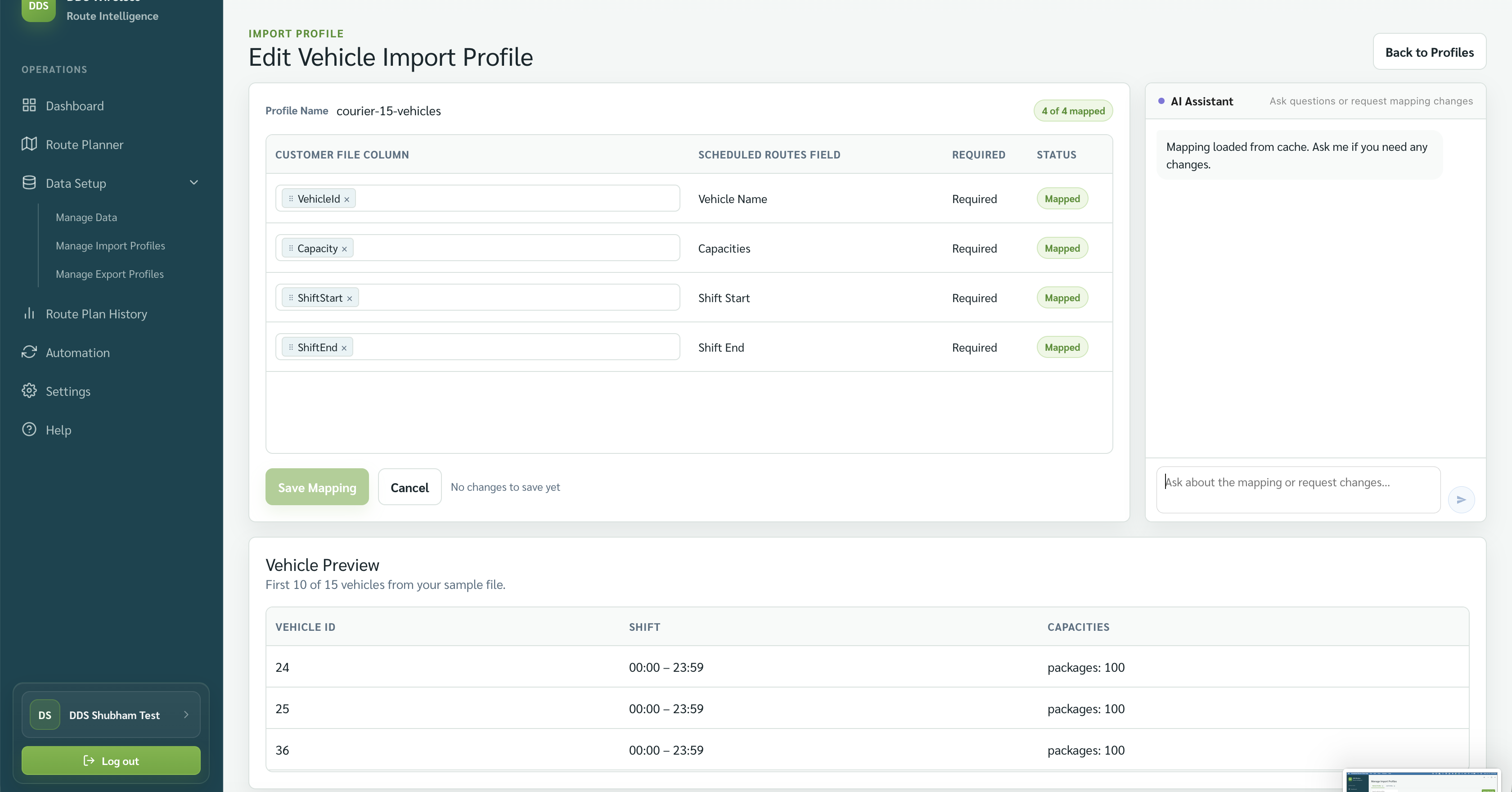
The four required attributes—Vehicle Name, Capacities, Shift Start, and Shift End—must be present in your file in some form. Review the proposed mapping to confirm Scheduled Routes has interpreted them correctly.
Download the vehicle template
Download the Scheduled Routes vehicle template
The template's first row contains suggested column names. Its second row marks each column as required or optional; delete that guidance row before importing your vehicles.
If you choose to use the template:
- Keep the first row of column names.
- Delete the second row containing Required * and Optional labels.
- Add one vehicle per row. Keep vehicle names unique within the file.
- Remove optional columns you do not use, or leave their cells blank.
- Save the file, import it, and review every proposed match before selecting Save Profile.
Start with the four required columns
Vehicle Name, Capacities, Shift Start, and Shift End are the only required mappings. Add optional attributes only when they affect your planning.
Required attributes
| Template column | What it means | What to enter |
|---|---|---|
| Vehicle Name | The stable name or ID that identifies the vehicle throughout Scheduled Routes. | A unique value such as VAN-01, Bus 12, or Driver A. Importing the same name again updates that vehicle's imported shift and capacities. |
| Capacities | A group of named limits describing how much the vehicle can carry. Each capacity type has its own number. | Use one numeric column for each capacity type you track. For example, use separate Ambulatory and Volume columns rather than putting both values in one Capacities cell. Enter the maximum that each vehicle can carry, using 0 when it cannot carry that type. |
| Shift Start | When the vehicle becomes available for work. | A 24-hour time such as 08:00. A true Excel time value is also accepted. |
| Shift End | When the vehicle's working window ends. | A 24-hour time such as 17:30. It must be later than Shift Start on the same day. |
Example: a vehicle with several capacities
If each vehicle has an Ambulatory limit and a Volume limit, keep them in separate columns:
| Vehicle Name | Ambulatory | Volume | Shift Start | Shift End |
|---|---|---|---|---|
| VAN-01 | 1 | 1000 | 08:00 | 17:30 |
| VAN-02 | 2 | 750 | 08:00 | 17:30 |
In the mapping review, select both Ambulatory and Volume as Capacities. Scheduled Routes will then understand that VAN-01 can carry up to 1 Ambulatory unit and 1000 Volume units.
Use the same capacity names for job demand. For example, Route Planner compares a job's Ambulatory demand with the vehicle's Ambulatory limit, and its Volume demand with the vehicle's Volume limit.
Adjust the template for your capacity types
The template's Capacities column is a placeholder. If you track one capacity type, rename it to the specific type, such as Volume. If you track several types, replace it with one column for each type, such as Ambulatory, Volume, and Wheelchair.
Optional attributes
| Template column | What it means | What to enter |
|---|---|---|
| Shift Start Location | Where the vehicle begins its shift. | Upload the address in the format your file already uses. If it is in one full-address column, map that column. If it is split across columns such as Street, City, Province/State, and Postal Code, select all of those columns during mapping and Scheduled Routes will combine them. You do not need to combine them in Excel first. |
| Shift End Location | Where the vehicle finishes its shift. | Use the same approach as the start location: map one full-address column, or select the separate address-part columns and let Scheduled Routes combine them. The end location can be the same as the start location or a different destination. |
| Skills | Special capabilities used to match the vehicle with jobs that require the same skills. | One or more skill names separated by commas, such as wheelchair, lift. Skill names should match those used on the jobs. |
| Repeat Type | How often this vehicle's shift repeats. | Use Daily, Weekly, Bi-Weekly Odd, Bi-Weekly Even, or Monthly. For a monthly schedule, a numeric value from 1 to 4 can identify the week of the month. |
| Frequency Days | The weekdays on which a recurring vehicle is available. | Combine these one-letter codes with no separators: M Monday, T Tuesday, W Wednesday, R Thursday, F Friday, S Saturday, and U Sunday. For example, MTWRF means weekdays. |
| Recurring Start Date | The first date on which the recurring schedule applies. | An Excel date, YYYY-MM-DD, or MM/DD/YYYY. |
| Recurring End Date | The last date on which the recurring schedule applies. | An Excel date, YYYY-MM-DD, or MM/DD/YYYY. |
| Last Known Location (Geo) | The vehicle's most recently reported coordinates, used to re-optimize from where it actually is. | Use two numeric columns—one for Last Known Latitude and one for Last Known Longitude. If you use this option, replace the template's single placeholder column with those two columns. |
| Last Known Address | An address alternative to latitude and longitude for the vehicle's most recently reported position. | A complete address. Scheduled Routes converts it to coordinates during import. Leave this blank when supplying latitude and longitude. |
| Last Known Time | When the last-known location was recorded. | A timestamp supplied by your vehicle system, preferably including the date, time, and time-zone offset—for example, 2026-08-05T14:30:00-07:00. |
How blank recurrence fields work
When all recurrence fields are blank, an imported vehicle is available every day beginning at the time of import, with no practical end date. Use the recurrence columns only when the vehicle follows a more limited schedule.
Skills must be mapped deliberately
Scheduled Routes does not automatically map a source column to Skills. In the mapping review, explicitly select the skills column or ask the AI assistant to map it.
Last-known location is for re-optimization
For Scheduled Routes to use a last-known position, provide either latitude and longitude or a last-known address, together with Last Known Time. Leave all last-known fields blank for normal first-time route planning.
You can complete or change Skills, Start location, End location, status, and frequency later under Data Setup → Manage Data → Vehicles.
Optional locations
Start location and End location are optional. Map them when your vehicle file includes those values, whether each address is stored in one column or several. Otherwise, leave them blank.
File preparation checklist
- Keep one vehicle per row.
- Keep column headings consistent when reusing a saved mapping.
- Keep each capacity type in its own numeric column and use the same capacity names for vehicle capacity and job demand.
- Check that shift end is later than shift start.
- Keep Frequency Days to the supported one-letter day codes.
- Review the Vehicle Preview before saving the mapping.
Accepted formats
A vehicle file used to create or edit an import profile must be CSV, XLS, or XLSX. The Import Vehicles button on Data Setup → Manage Data → Vehicles, which reuses an existing profile, additionally accepts PDF. There is no fixed file-size limit. Addresses are matched with fuzzy logic that finds the closest location, so exact formatting isn't required. Times are read in the app's (your) time zone.
Related: Import your vehicles · Saved mappings · Manage vehicles